
USAA Mobile
USAAFinance
4.766.14K Reviews
- Version
- 11.16.2
- Installs
- 10.00M
- Age Rating
- Everyone
Screenshots


Our Review of USAA Mobile
 Analysis by Appyee
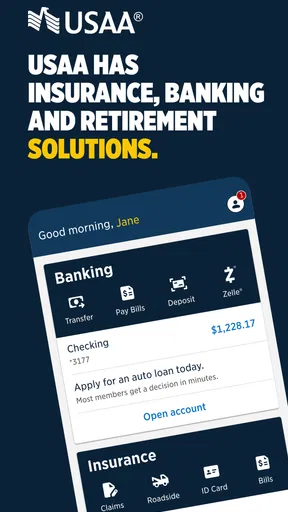
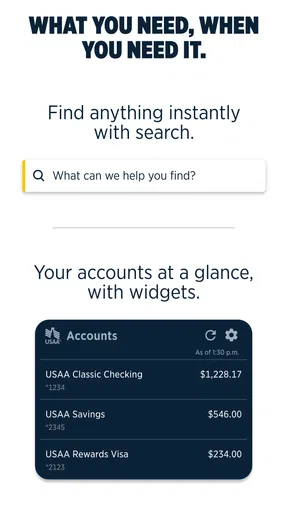
I found USAA Mobile most useful when I treated it as a daily control panel rather than just an app for checking a balance. It brings USAA banking, insurance, and investment accounts into one place, so I could move from a checking account to an insurance detail without changing services or keeping several unrelated apps open. That combination is the reason to consider it, especially if most of your financial life already sits with USAA.
It is a free finance app from USAA, available for everyone by age rating, and its overall reception is strong: a 4.7 average from around 498 thousand ratings, with more than 10 million installs. The current version is 11.16.2 and requires Android 12 or later. Those details matter less than the practical question, though: does having banking, insurance, and investing together actually make everyday tasks easier? In my experience, it does, but only when you use a few repeatable habits instead of opening it without a plan.
Using USAA Mobile as a daily financial workspace
I use the phrase “daily financial workspace” to mean a place for checking the right information and completing a specific task—not a reason to keep the app open. That distinction helps me decide what belongs in a quick visit and what deserves a more careful review. Next, I’ll look at how a steady routine can make the combined banking, insurance, and investment areas easier to navigate without blurring their different purposes.
The baseline workflow is simple, but consistency makes it useful
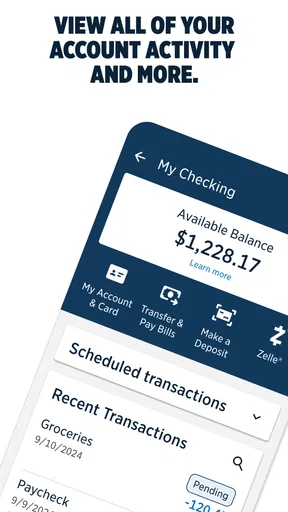
My normal starting point is a quick account review. I check the available money in the accounts I use most, scan recent activity, and then leave rather than browsing aimlessly. This takes advantage of the app’s strongest quality: it puts the information I need close together. A short routine is more useful than repeatedly refreshing the same screen throughout the day.
For a typical weekday scenario, imagine paying for fuel in the morning, receiving a deposit later, and needing to confirm that an automatic payment has posted. Instead of opening a separate banking app, an insurance portal, and an investment service, I can use the USAA experience as the first place to look. The value is not that every task becomes instant; it is that the context stays in one financial relationship.
I recommend separating “checking” from “acting.” First review transactions and balances. Then decide whether you need to transfer money, manage a payment, inspect an insurance item, or look at investments. This small distinction reduces accidental taps and makes it easier to notice an unfamiliar transaction before doing anything else.
The app is also a practical place to maintain a regular money habit. I would not use a single glance as a complete financial review, but I would use it for frequent awareness. A short check after major spending, before a large payment, or at the end of the week can reveal whether your account activity matches what you expected.
Banking, insurance, and investing do not feel identical
The banking side is naturally the part most people will visit often. It is where I would look for balances, recent transactions, and routine account actions. Insurance has a different rhythm: you may only need policy information or account-related details occasionally, but having that information beside banking can be convenient when planning household costs.
Investments require a different mindset. A quick app view can help you stay aware of account information, but it should not encourage impulsive decisions based on a single market movement. I see the investment area as a monitoring tool within a broader plan, not as a replacement for understanding risk, goals, or the details of a transaction.
This mixture is a genuine advantage for existing USAA customers. A general banking app may offer a polished account experience, while a separate insurer app may handle policies well, but switching between providers creates extra logins, extra notifications, and extra places to remember. USAA Mobile reduces that fragmentation for people whose accounts already belong to the same organization.
On the other hand, the same integration is less valuable if you only use USAA for one narrow service. Someone who keeps checking, insurance, and investments with different companies may prefer a dedicated banking app, an insurer’s app, and an investment platform designed around each individual need. The convenience here comes from consolidation, not from being the best specialist tool for every possible financial task.
Settings worth checking before relying on it
When I install a finance app, I do not immediately start changing every option. I first review sign-in and security settings, notification behavior, and the way account information is presented. With USAA Mobile, that order is sensible because convenience can become noisy if every alert is enabled, while too few alerts can make important activity easier to miss.
Security deserves more attention than visual customization. Use a strong device lock, keep the operating system current, and avoid treating a remembered session as a substitute for account awareness. If the app offers sign-in choices on your device, choose the method that balances speed with protection rather than automatically selecting the fastest option.
Notifications should support a routine, not interrupt it. I prefer alerts that help me notice meaningful account activity while avoiding a stream of minor reminders that I will eventually ignore. The right setup depends on how often you review accounts manually. If you check daily, fewer notifications may be enough; if you check less often, timely activity alerts become more valuable.
It is also worth checking which accounts and services are visible to you. A combined financial app can feel confusing if you do not know whether you are looking at a bank balance, an insurance-related item, or an investment account. Before making a transfer or acting on a number, confirm the account name and destination. That pause is especially useful when several accounts have similar labels.
My most useful settings habit is to review notifications after a few days of real use. Initial choices are guesses. Once you see which alerts help and which ones add clutter, adjust them around your actual routine. This is more effective than leaving every default untouched or disabling everything after one busy afternoon.
Faster patterns for repeat tasks
The quickest way to use the app is to build a fixed sequence for tasks you repeat. I use the same order when checking money: open the app, authenticate, review the primary account, scan recent activity, and only then move to a specific action. Repeating that path makes the app feel faster because I spend less time deciding where to begin.
For transfers or payments, I would prepare mentally before opening the relevant screen. Know which account should be used, how much you intend to move, and what the action is meant to accomplish. This is not just about saving time. It lowers the chance of selecting the wrong account in a multi-account environment.
A useful weekly pattern is to combine the app with a simple external habit, such as a note or budget category you already maintain. Use USAA Mobile to verify what actually happened, then compare it with your plan. The app is strongest at showing account information and supporting account management; it should not be forced to replace every budgeting method a household may already use.
Insurance users can benefit from a similar pattern. Rather than opening the insurance area only during a stressful event, check it when reviewing recurring household finances. That makes it easier to remember where policy-related information lives and reduces the scramble that often happens when a document or account detail is suddenly needed.
For investments, I would set a deliberate review schedule instead of checking whenever the market feels dramatic. The app makes access convenient, but convenience can become a weakness if it encourages emotional reactions. A repeatable schedule turns the investment section into a reference point rather than a source of constant distraction.
Another practical tip is to keep the app’s role clear when you are troubleshooting. If a transaction looks unfamiliar, first inspect the transaction details and account context. If the issue concerns insurance, move to that service area instead of continuing to search through banking screens. This sounds obvious, but the combined structure can lead users to assume every problem belongs in the same workflow.
Where the all-in-one design reaches its limits
The biggest limitation is also the app’s main selling point: it covers several financial services at once. That breadth is convenient, but it means the experience may feel less focused than a specialist app built only for investing, budgeting, or insurance. Users who want deep analysis, elaborate budgeting tools, or a highly specialized trading workflow may be better served elsewhere.
I would also avoid assuming that a unified view eliminates the need to understand each account. Banking balances, insurance information, and investments answer different questions. A balance can show what is available, but it does not automatically explain upcoming obligations. An investment value can change, but it is not the same as spendable cash. The app brings the areas together; it does not remove the need to interpret them correctly.
People who do not have a broad USAA relationship may find the integrated design less compelling. If your main need is basic banking and you already prefer another provider, switching solely for a combined dashboard may not justify the disruption. Likewise, someone who wants a standalone budgeting system with extensive category analysis should compare dedicated alternatives rather than expecting a finance hub to do everything.
Device compatibility is another practical consideration. The current Android release requires Android 12 or later, so anyone using an older phone should check compatibility before planning around it. For supported devices, keeping the app and operating system updated is a sensible part of maintaining a finance workflow, particularly when access and security are involved.
There is also a human limitation: no app can make financial organization automatic if the user never reviews it. USAA Mobile can make information easier to reach, but it cannot decide whether a purchase fits your plan, whether an investment change is appropriate, or whether an insurance detail still matches your situation. Those decisions remain yours.
Who will get the most from it
I would recommend it first to people who already use USAA for more than one service. For them, the app can reduce the mental overhead of managing separate financial relationships. It is particularly convenient for someone who wants a single mobile starting point for everyday banking while still being able to reach insurance and investment information when needed.
It also suits users who prefer a straightforward routine over a complicated personal-finance system. If your ideal workflow is “check accounts, review activity, handle a task, leave,” the combined layout should make sense. The strong rating and broad adoption suggest that many users find this basic approach dependable enough for regular access.
I would be more cautious recommending it to a person who wants advanced portfolio research, detailed financial planning, or a complete replacement for a budgeting application. Those needs call for specialized tools and more depth than a unified account-access app is designed to provide. The same applies to users who dislike consolidated dashboards and would rather keep banking, insurance, and investments completely separate.
Families and households should also decide who needs access and for what purpose. A shared financial routine can be helpful, but each person should understand which account or service they are viewing before taking action. The app’s convenience should not encourage casual handling of sensitive financial information.
My verdict after building a repeatable routine
USAA Mobile succeeds because it connects everyday banking with insurance and investment access in one finance app without requiring me to treat each service as a separate destination. Its best use is not endless browsing. It is a calm, repeatable process: authenticate safely, check the right account, confirm recent activity, complete one intentional task, and close the app.
The settings and habits matter more than they may seem. Thoughtful notifications prevent noise, checking account context reduces mistakes, and scheduled investment reviews discourage emotional decisions. These are simple practices, but they turn a broad app into a more reliable personal workflow.
My final view is positive for existing USAA customers, especially those who value consolidation and quick access over specialist-level tools. I would choose a dedicated alternative when budgeting depth, investment analysis, or another provider’s services are the real priority. For the right user, though, the combination of convenience, account access, and a familiar routine makes this a strong free choice.
With an Everyone age rating and availability for supported Android devices, it is approachable for a wide audience. Just remember what it is best at: bringing your USAA financial relationship together and making routine management easier. It works best when you use it deliberately, not when you expect one app to make every financial decision for you.
Verdict
Strengths of USAA Mobile
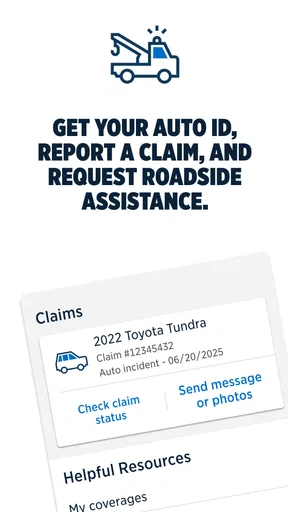
- Comprehensive banking, insurance, and roadside assistance tools in one app
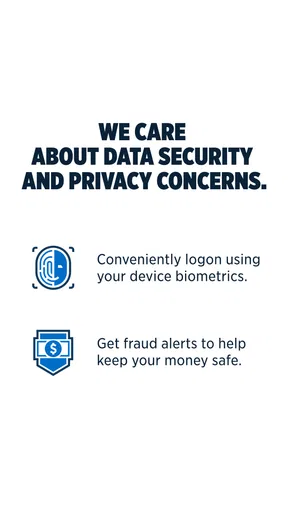
- Biometric login makes account access quick and convenient
- Real-time transaction alerts help monitor spending and account activity
- Easy mobile check deposits with clear photo-capture guidance
- Secure messaging provides a direct way to contact USAA support
Limitations of USAA Mobile
- Most useful features are limited to eligible USAA members
- Some insurance tasks may redirect to separate web pages
- Advanced budgeting and spending-analysis tools are relatively limited
- App performance can vary after major updates or during maintenance
- Not all account services can be completed without contacting an agent
Other Releases by USAA
View All
USAA DriveSafe
Auto & Vehicles3.7
Similar Picks in This Category
View All
Google Wallet
Google LLC4.3

Airtel: Recharge, Bank & Loans
Airtel4.0

PayPal - Pay, Send, Save
PayPal Mobile4.2

DANA Indonesia Digital Wallet
PT Espay Debit Indonesia Koe4.5

Binance: Buy Bitcoin & Crypto
Binance Inc.4.8

Cash App
Block, Inc.4.7
Frequently Asked Questions
What is USAA Mobile, and who can use it?
USAA Mobile is the official banking and insurance app from USAA, designed for eligible military members, veterans, their families, and other qualified customers. After signing in, users can manage accounts, review balances, transfer money, deposit checks, pay bills, access insurance information, and contact support. Eligibility for USAA products is required, so downloading the app alone does not create an account or guarantee access to every feature.
What banking features are available in the USAA Mobile app?
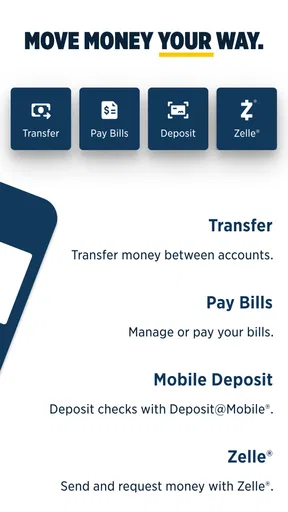
The app provides a broad selection of everyday banking tools in one place. During testing, users can view account activity, move money between eligible accounts, send transfers, pay bills, locate ATMs, and deposit checks using the phone’s camera. Available options may vary by account type, location, security status, and USAA eligibility. Some transactions can also be subject to limits, processing times, or additional verification.
Can I manage my USAA insurance policies through the app?
Yes, eligible customers can generally use USAA Mobile to view policy details, access insurance documents, review billing information, make payments, and begin certain claims or service requests. The exact tools depend on the insurance products attached to the account, such as auto, home, renters, or other coverage. The app is convenient for routine tasks, but complex claims or urgent situations may still require speaking with a representative directly.
Is USAA Mobile safe for banking and insurance management?
USAA Mobile includes security measures intended to protect sensitive financial and personal information, such as encrypted connections, secure login controls, device verification, alerts, and optional biometric authentication where supported. Users should still install the app only from the official Google Play Store or Apple App Store, keep their operating system updated, avoid public Wi-Fi for sensitive actions, and never share passwords or one-time verification codes with anyone.
What should I do if the USAA Mobile app is not working or I cannot log in?
If the app fails to open, loads slowly, or rejects a login, first check your internet connection, update the application, restart your device, and confirm that your phone’s operating system is supported. Avoid repeatedly entering incorrect credentials because security controls may temporarily restrict access. If the problem continues, use USAA’s official support channels or website, and contact customer service through a verified number rather than relying on links from unsolicited messages.
